
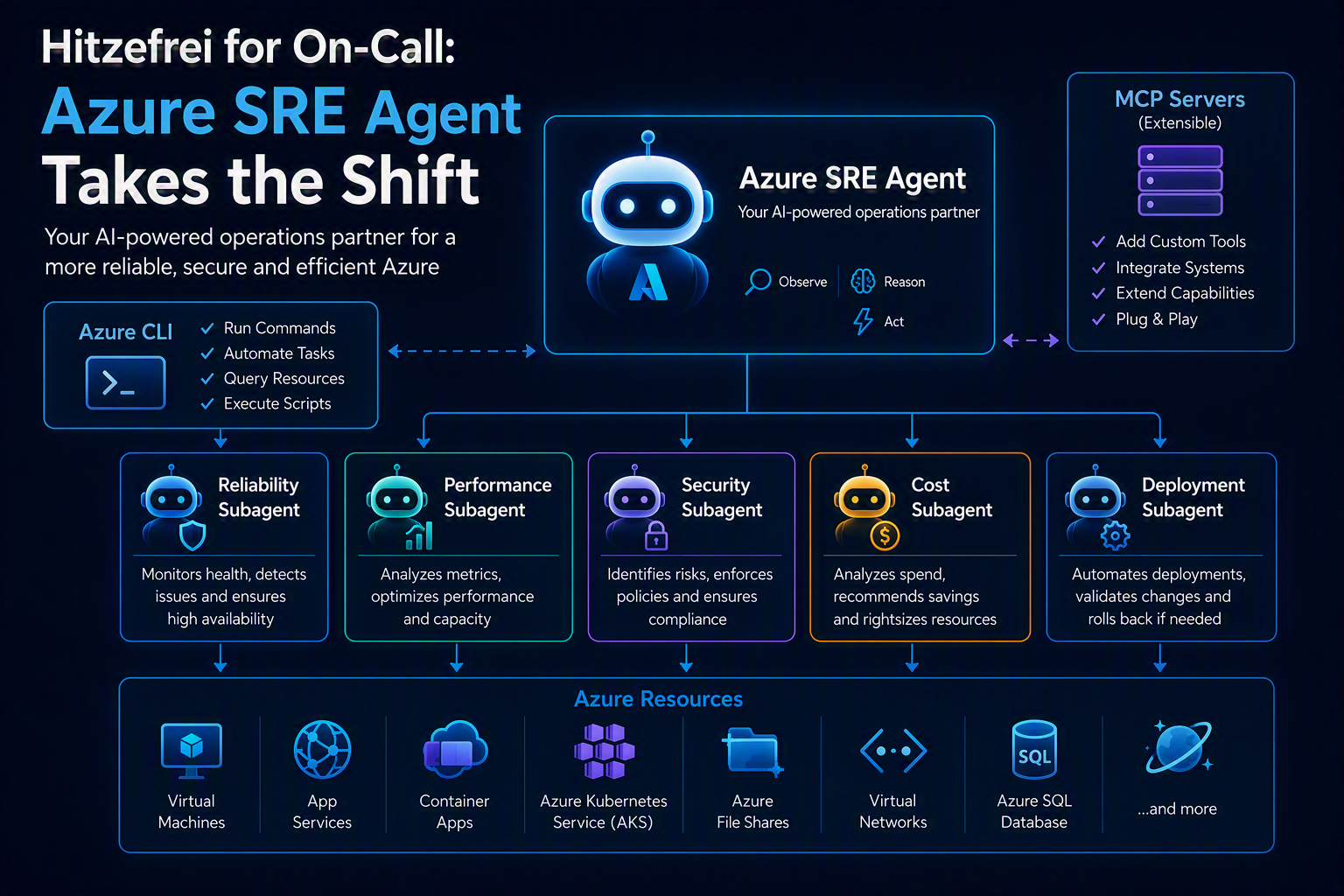
Hitzefrei for On-Call: Azure SRE Agent Takes the Shift
📌 Language Version: Diesen Artikel auf Deutsch lesen
Hitzefrei for On-Call: Azure SRE Agent Takes the Shift
1. Introduction — Why This Article, Why Now
It’s 35 degrees outside, the office is empty and this would actually be the perfect time for a day off. If it weren’t for the usual problem: someone has to be on call. Someone has to respond to alerts. Someone has to dig through logs at 2pm while everyone else is getting ice cream. What if that someone is an AI?
With the Azure SRE Agent, Microsoft brought exactly that to General Availability in March 2026: an autonomous digital Site Reliability Engineer that investigates incidents, analyzes root causes and — depending on configuration — takes action itself. No more preview, no more waitlist game. GA. And that makes it time to take a serious look at this thing.
In this article I’ll show you what the Azure SRE Agent can actually do, how to deploy it in a typical enterprise landscape, what it means from an identity and governance perspective, and what it concretely costs you.
2. What Is the Azure SRE Agent?
Anyone hearing „Azure SRE Agent” for the first time usually thinks of yet another monitoring dashboard with an AI sticker on it. That’s not what it is.
The Azure SRE Agent is an autonomous system that runs continuously in the background, evaluates telemetry and when incidents occur doesn’t just send a notification — it starts working. Analyzing root causes, testing hypotheses, establishing connections between deployments and failures — all without anyone having to open a chat window.
Root Cause Analysis is the core. The agent correlates logs, metrics and service dependencies across multiple layers — app, platform, infrastructure — and explains the result clearly and comprehensibly. Not „here are 47 log lines, good luck”, but a structured diagnosis with a concrete recommendation.
Persistent Memory means the agent learns from every investigation. It builds its own knowledge base — root causes, successful resolution paths, known patterns in your environment. The next time a similar incident occurs it draws on this knowledge. The tribal knowledge that otherwise lives in the head of your most experienced team member becomes systematically accessible.
Background Intelligence runs even when nobody is actively interacting with the agent. It analyzes your source code, your deployment configs, your operational history — continuously, in the background. When an incident hits, the context is already loaded. No cold-start problems.
This isn’t a concept — Microsoft has been running the SRE Agent internally in production for over a year: more than 1,300 agents deployed, over 35,000 incidents mitigated, more than 20,000 engineering hours saved per month. That same platform has been available to every Azure customer since March 2026.
How autonomous should it be? You decide. The agent supports two modes. In Review Mode it suggests actions and waits for your approval. You see exactly which Azure CLI call will be executed on which resource, you confirm — and only then does anything happen. Full control, full transparency. In Autonomous Mode it acts independently within defined guardrails. Service restarts, scaling, rollbacks — without anyone having to wake up at 3am.
I always recommend starting with Review Mode. Not because the agent is unreliable, but because you should first get a feel for its behavior in your specific environment before handing over the keys.
3. Architecture: How the Agent Fits Into Your Azure Landscape
Before you click „Deploy”, it’s worth taking a quick look at the architectural principle — because the Azure SRE Agent follows a clear separation of concerns that you should get right from the start.
The agent itself lives in one subscription — ideally a dedicated management or platform subscription. From there it monitors and manages resources in any number of other subscriptions. In practice it looks like this:
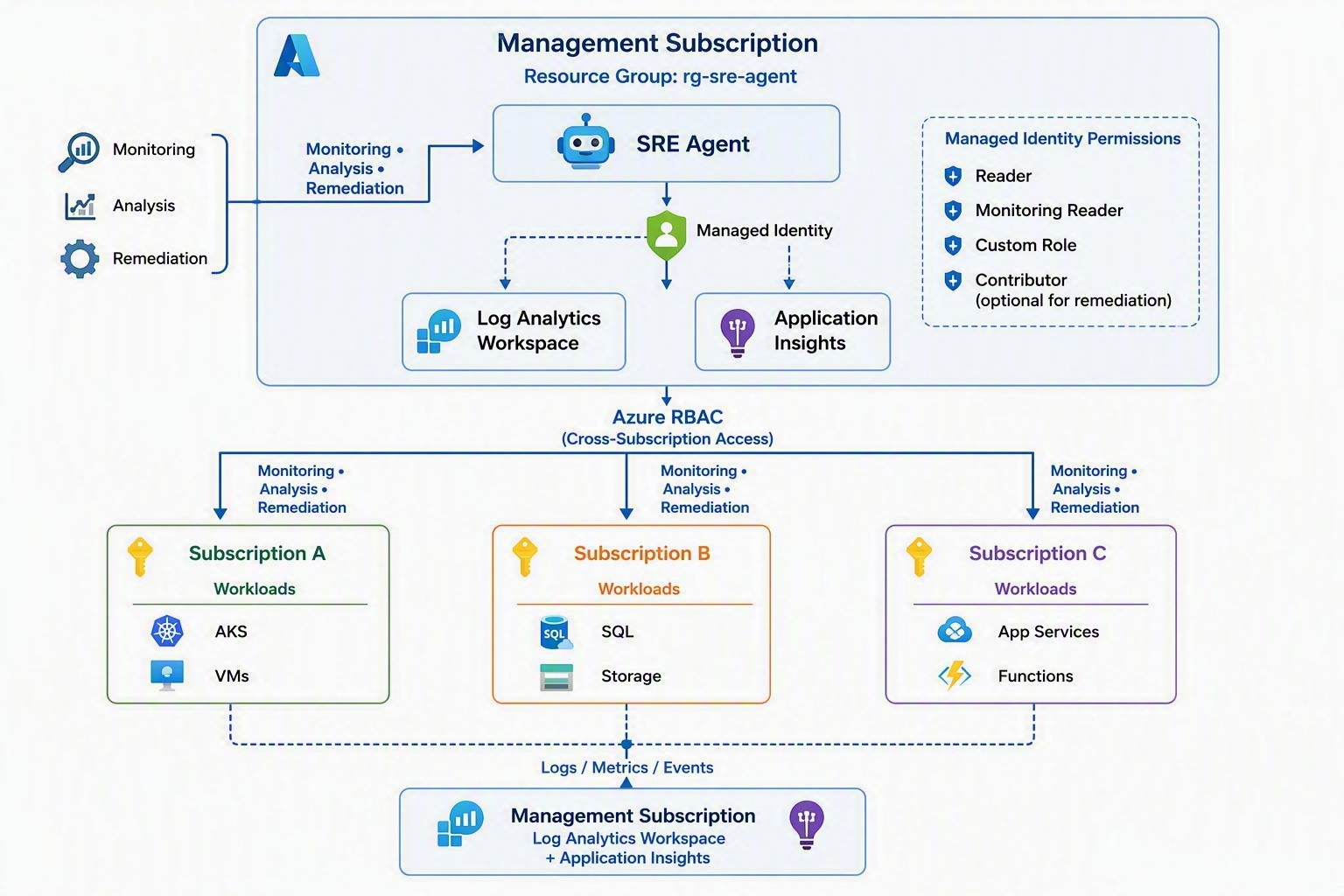 The advantage of this pattern: the agent infrastructure is cleanly separated from the managed workloads. Lifecycle, costs and governance can be controlled independently. And you avoid having the agent sitting in the same subscription as the systems it’s supposed to monitor — which can quickly become a problem during an incident.
The service coverage is already very broad today. Compute (VMs, App Service, Container Apps, AKS, Functions), Storage (Blob, File Shares, Managed Disks), Networking (VNets, Load Balancer, Application Gateways, NSGs) and Databases (Azure SQL, Cosmos DB, PostgreSQL, MySQL, Redis) — all via Azure CLI and REST APIs. For hybrid environments there’s also the option to connect on-premises workloads via Azure Arc.
This is the most common blocker during onboarding in practice, so I’ll say it directly: without a solid monitoring baseline the agent doesn’t work meaningfully. Concretely that means: Azure Monitor must be active for the target workloads, Diagnostic Settings must send logs and metrics to a Log Analytics Workspace, and Application Insights should be integrated for application-side telemetry. The agent automatically deploys its own Log Analytics Workspace and Application Insights in its resource group during setup. But that doesn’t replace the Diagnostic Settings on your workload resources — you have to ensure those yourself. Anyone who cuts corners here gets an agent that runs but stumbles around in the dark during an RCA.
For European customer projects, Sweden Central is the obvious choice for the Control Plane region. GDPR-compliant, Microsoft EU Data Boundary covered. Anyone with sovereign cloud requirements — I’ll get to that in the conclusion, as there are still open questions there.
What many people miss at first glance: the agent is not a closed system. Via MCP Connectors it can be connected to any external systems — ServiceNow, PagerDuty, Jira, Datadog, Splunk. And via custom Python Tools, internal HTTP endpoints can be integrated. This makes it the intelligence layer over existing operations toolchains, not a replacement for them.
4. Deployment Step-by-Step
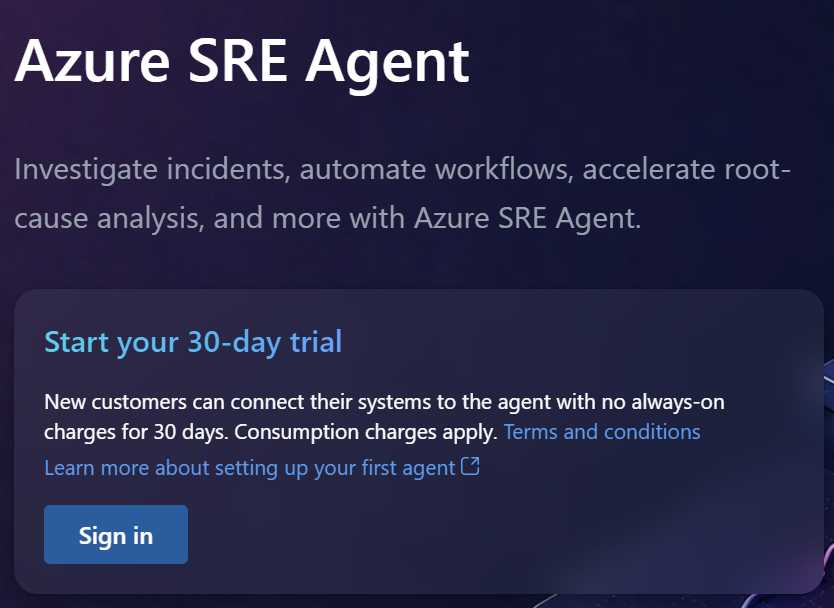 The entry point is sre.azure.com — not the Azure Portal. That regularly causes confusion the first time.
Before you click „Create agent” there, three things to sort out first. You need Owner or User Access Administrator on the management subscription and on the target subscription — the wizard automatically makes RBAC assignments to the managed identity, without these permissions the deployment fails. You need to register the resource provider once:
az provider register \
  --namespace Microsoft.SREAgent \
  --subscription <management-sub-id>
And if you’re running a corporate proxy or Azure Firewall: *.azuresre.ai must be reachable outbound over HTTPS. That one gets forgotten regularly.
In the wizard itself there’s one decision you should make consciously: under „Azure Resources” you select the target subscription as a whole — not individual resource groups. This gives the agent the broadest view of the managed environment and prevents it from hitting subscription boundaries during an investigation. The wizard transparently shows which RBAC roles will be automatically assigned: Log Analytics Reader, Monitoring Reader, AKS Cluster User and others depending on the services present.
Region: Sweden Central. GDPR-compliant, EU Data Boundary covered, the obvious choice for European customer projects.
Deployment takes 2–5 minutes. What lands in your resource group afterwards:
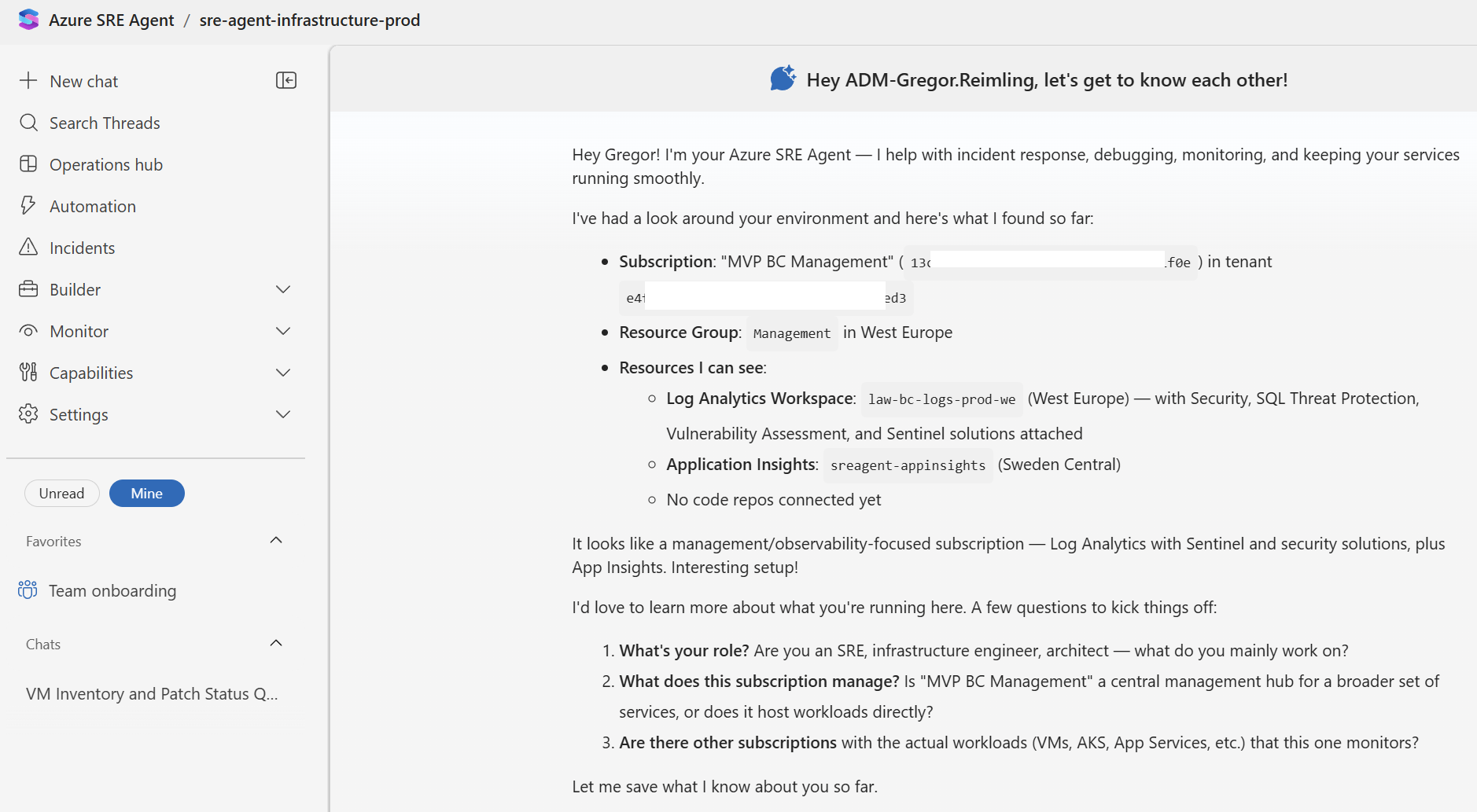
Directly after deployment, two quick smoke tests in chat. First test — verify access:
What subscriptions and resource groups can you currently see?
The agent should list the target subscription with all its resource groups. If that works, the cross-subscription RBAC is correctly configured. Second test:
Give me an overview of the health status of all resources in the target subscription].
Here you see for the first time how the agent aggregates and presents telemetry — and immediately where the gaps in your monitoring baseline are, if any still exist.
5. Identity & Governance — What Architects Need to Know
As soon as you introduce the Azure SRE Agent in an enterprise environment, the question comes from the security team: „What identity does the agent have, where does it show up and what permissions does it have?”
The answer regularly surprises people: during deployment two Managed Identities are automatically created. The first is the User Assigned Managed Identity (UAMI) — that’s the identity you work with. It sits as a standalone resource in your resource group (id-sre-agent-prod), you assign RBAC roles to it, and the wizard references it when setting up connectors. The second is a system-internal identity for platform operations — ignore it.
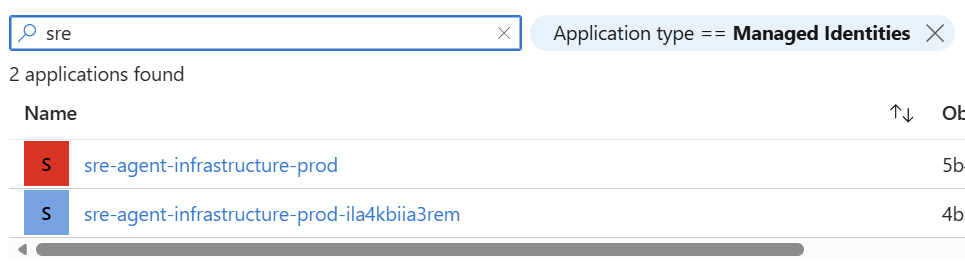
The most common mistake during first onboarding: looking for the agent under App Registrations in the Entra Admin Center. It doesn’t show up there — and that’s correct. Managed Identities are not App Registrations. The right place is Entra Admin Center → Enterprise Applications, but only with an explicit filter: Application type == Managed Identities. Without that filter they’re invisible in the list. Alternatively directly in the resource group — the UAMI sits there as a standalone resource. Or via sre.azure.com under Settings → Azure settings, where there’s a direct „Go to Identity” link.
What many people don’t have on their radar: the agent shows up in the Non-interactive Sign-in Logs whenever it obtains tokens for Azure API calls. For customers with strict compliance requirements — DORA, ISO 27001 — this is a relevant point that should be actively communicated. You can use it to trace exactly when the agent accessed which resources.
For RBAC configuration, Least Privilege applies from day one. The wizard automatically assigns read roles on the target subscription during onboarding — for Review Mode that’s sufficient. Once you want to enable Autonomous Mode for certain actions, never assign Contributor at subscription level. Always scope to the resource groups where the agent actually needs to intervene, and always use the most specific role that covers the use case — Website Contributor for App Service restarts, not Contributor on the entire subscription.
One security note you should be aware of: in April 2026 Microsoft patched a scoping bug in the Entra ID Agent ID Administrator role. The fix was fully rolled out by April 9th, no manual action required. But whoever in your organization holds this role should be reviewed — PIM-eligible, not permanently assigned.
On the topic of Entra Agent ID — the new identity concept behind agent identities in general — I’ll write a separate article. The topic deserves more depth than a single section can provide.
6. Knowledge & Memory — What the Agent Knows and Remembers
A freshly deployed Azure SRE Agent is like a new colleague on their first day: technically competent, but without any contextual knowledge about your specific environment. It knows Azure, it knows the APIs, it knows best practices — but it doesn’t know how your application is built, which incidents have occurred in the past, or which workarounds your team has already established. That changes — but only if you actively work on it.
The agent’s memory lives on the Microsoft-managed SRE Agent platform, not in your subscription. There’s no storage account in your resource group that you can directly inspect or export. For GDPR-conscious projects this is a point that will come up in security assessments — similar to Copilot Studio, you’re accepting that certain content leaves Microsoft’s platform infrastructure. Anyone populating runbooks with internal credentials or architecturally sensitive details should keep that in mind.
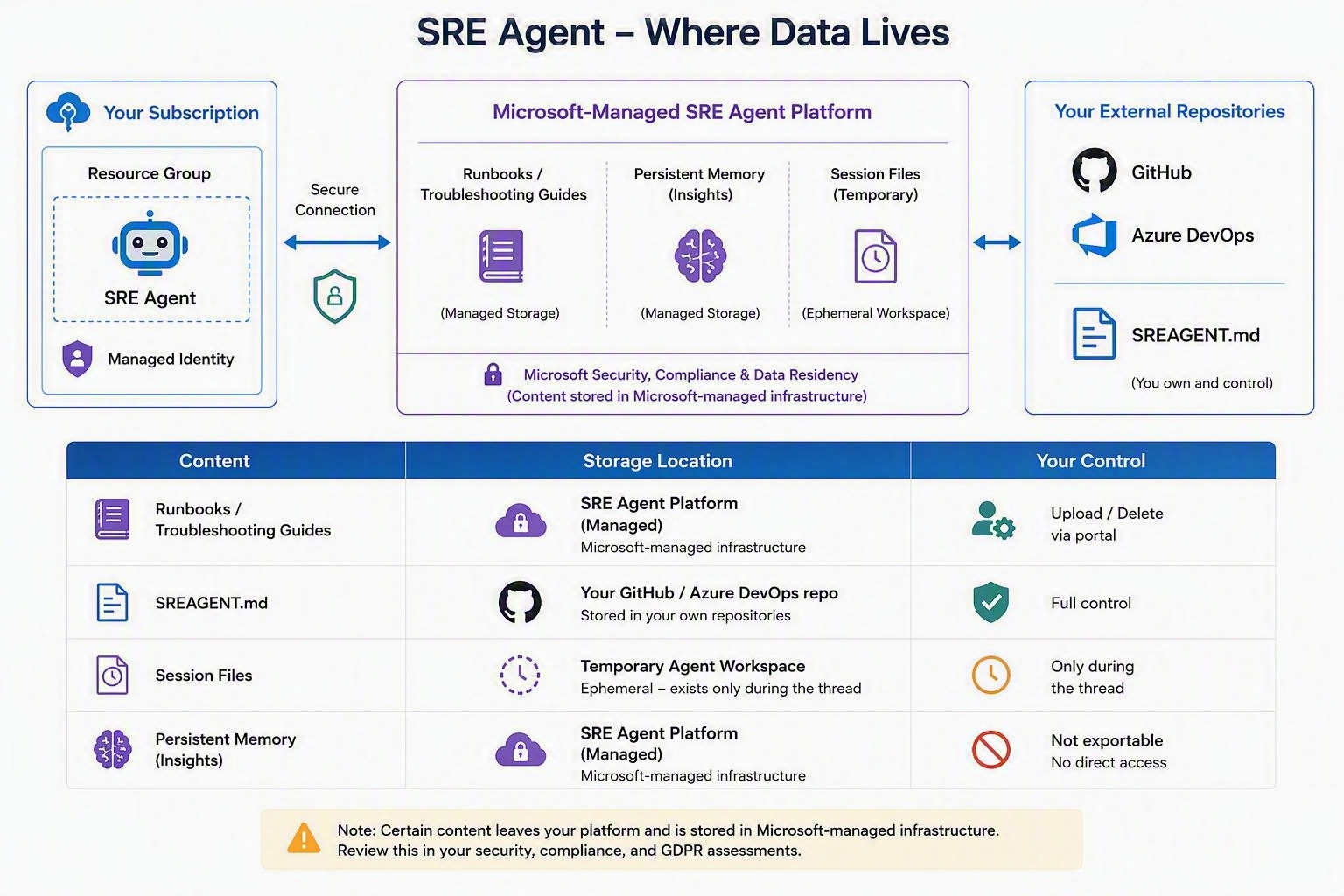
| Content | Storage location | Your control |
|---|---|---|
| Runbooks / Troubleshooting Guides | SRE Agent Platform (managed) | Upload / Delete in portal |
| SREAGENT.md | Your GitHub / Azure DevOps repo | Full control |
| Session files | Temporary agent workspace | Only during the thread |
| Persistent Memory (Insights) | SRE Agent Platform (managed) | Not exportable |
As soon as you connect a code repository something interesting happens: the agent analyzes project structure, tech stack, deployment configs and service dependencies — and creates an SREAGENT.md as a pull request in your repository. That’s its first understanding of your architecture, documented in Markdown and version-controlled. Review the PR, adjust, merge — what’s in there directly influences how accurately the agent works during future investigations.
Under Builder → Knowledge base you manage all further knowledge sources: uploaded files, web pages by URL and connected repositories. The approach I recommend: create a dedicated sre-runbooks repository, maintain all relevant runbooks, postmortems and architecture docs there as Markdown, and connect that repo in the agent as a knowledge source. Git versioning, PR review process and audit trail included — and the agent has everything semantically searchable at all times.
The most elegant workflow emerges when you task the agent directly after a successful investigation to preserve what was learned:
"Create a troubleshooting guide from the steps we just followed and save it to Knowledge settings."
The agent generates a structured document, uploads it and indexes it automatically. The next time a similar incident occurs it finds that guide and works with it. Over time a knowledge base emerges that actually comes from your environment — not from generic best practices. In the first weeks the agent is still lightly contextualized. After two to three months of active use with consistent knowledge building that changes noticeably — and that’s the point where the ROI becomes tangible.
7. Costs — Transparently Calculated
The Azure SRE Agent’s pricing model is transparent — but there’s a fixed cost component that runs regardless of actual usage, and you should know about it before spinning up your first agent. Billing is based on Azure Agent Units (AAU), a standardized unit that Microsoft has introduced for all prebuilt Azure agents. Your monthly bill always consists of two parts: a fixed Always-on Flow and a variable token-based Active Flow.
The Always-on Flow runs from the moment the agent is created — 4 AAU per hour, regardless of whether the agent is doing anything. At an AAU price of $0.10 that comes to $297.60 per month per agent. Even a stopped agent continues to incur these costs. Only deleting the agent stops billing entirely. For PoC phases that means: delete consistently when the test is complete.
The Active Flow is token-based and depends directly on the chosen model. That’s where the biggest cost lever sits:
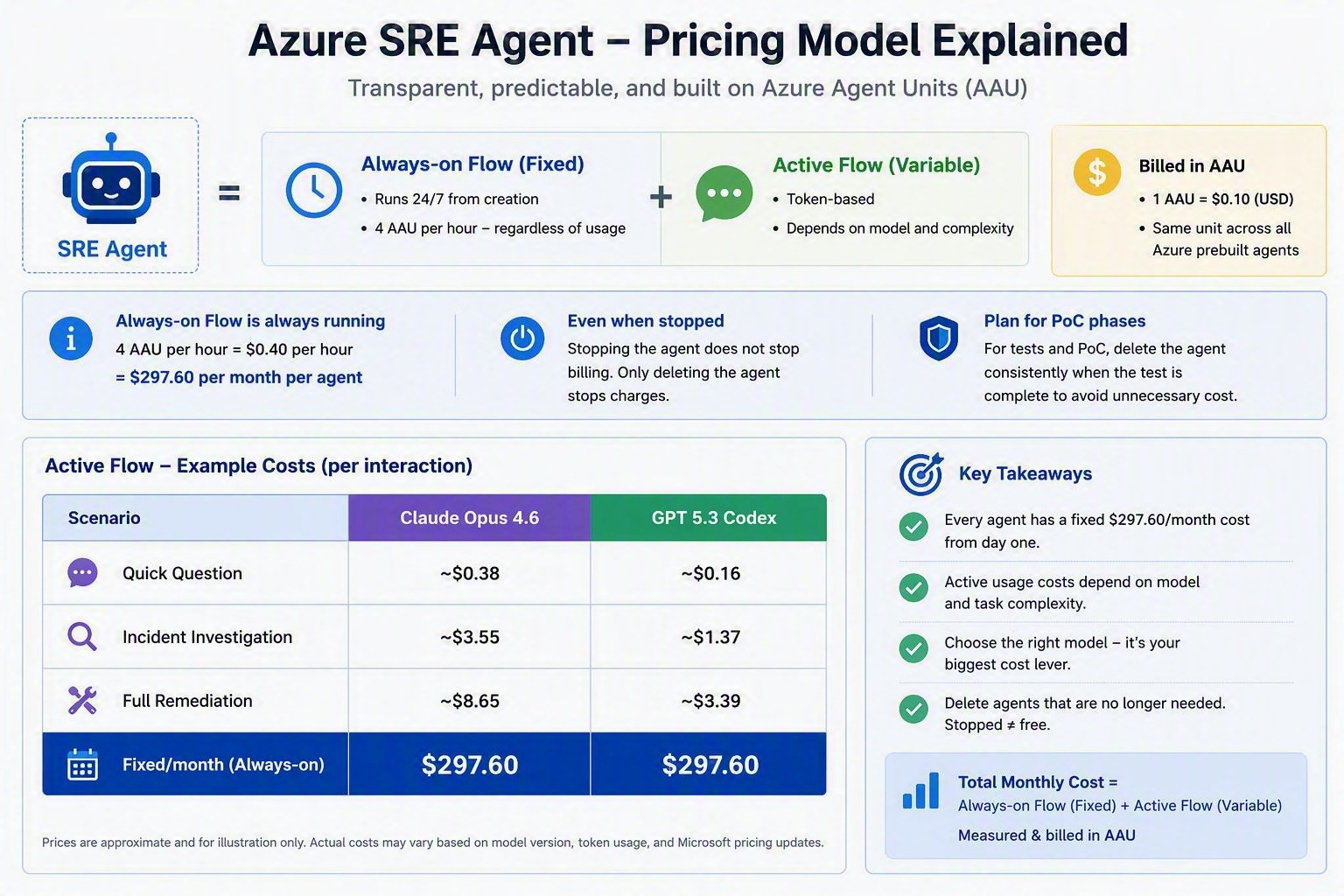
| Scenario | Claude Opus 4.6 | GPT 5.3 Codex |
|---|---|---|
| Quick Question | ~$0.38 | ~$0.16 |
| Incident Investigation | ~$3.55 | ~$1.37 |
| Full Remediation | ~$8.65 | ~$3.39 |
| Fixed/month (Always-on) | $297.60 | $297.60 |
Claude Opus 4.6 is roughly three times more expensive on output than GPT 5.3 Codex. For standard scenarios — incident investigation, service health checks, routine remediations — GPT is the more cost-efficient choice. Claude makes sense when you have very complex multi-step reasoning tasks. GPT 5.3 Codex doesn’t support prompt caching — hence no cache-write line item in the bill.
What this means in practice: a complete automated incident investigation with GPT costs around $1.37 — less than five minutes of engineer time at a typical enterprise day rate. That’s the argument that counts when the business case is being discussed internally.
The other relevant cost levers in brief: one agent for multiple subscriptions instead of multiple agents saves the fixed costs for each additional agent. Response Plans ensure that not every Azure Monitor alert triggers a full investigation. And under Settings → Agent consumption you can set a monthly Active Flow limit — when reached the agent freezes chat and autonomous actions, Always-on continues running. Always recommended for getting started.
A note for European readers: all prices above are in USD. The current EUR equivalent varies by region and enterprise agreement type — check the Azure Pricing Calculator for the current rate in your region before building your business case.
8. Conclusion & Personal Assessment
Time off is really just for school kids. But the idea behind it — getting out of reactive mode, creating space for what matters — is exactly what the Azure SRE Agent is about.
Over the past few years I’ve seen many „AI for Ops” announcements that delivered little in practice. The Azure SRE Agent is different — not because it’s perfect, but because Microsoft runs it internally in production and the numbers are real. That gives the product a credibility that many announcements in this space don’t have.
What personally convinced me is the interplay between autonomous action and explicit governance. Review Mode is not a restricted mode — it’s the right starting point. You learn the agent’s behavior in your own environment, build trust, and gradually grant more autonomy. That’s how you handle AI agents in production responsibly.
Where I’d still be cautious today: sovereign cloud requirements (Delos, Stack IT) need to be clarified with the Microsoft account team upfront — the available Control Plane regions are currently still limited. And for hybrid environments with classic Active Directory and Kerberos-dependent applications the agent isn’t the right answer yet. For pure Azure workloads that doesn’t apply — there it’s production-ready today.
On the roadmap: VNet Integration for locked-down network environments and extended governance controls via Hooks — both points that are relevant for enterprise deployments and that I’m flagging for a follow-up article.
Note: This article is part of the #Hitzefrei campaign — a community initiative focused on AI in operations and reliability.
The agent sweats. You don’t have to anymore. At least not because of incidents.
Tags for this article:
Filed under: Azure , Community & Events , Certifications , Microsoft Security
← All posts